
Upgrade or renew your plan
Manage your Shopnix subscription from Store Manager. When your subscription is about to end, you'll see a message at the top of the screen, and you can renew or upgrade your plan from there.
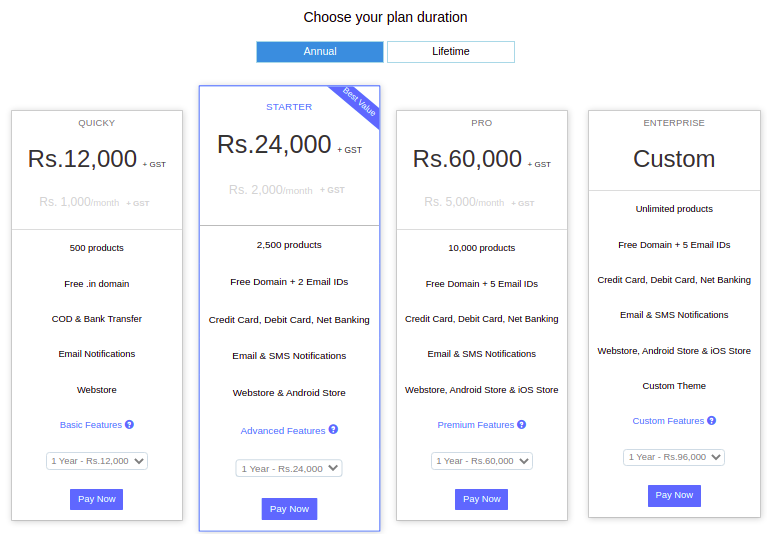
You also see an upgrade prompt when you open a feature that your plan doesn't include. The prompt takes you to the plan page, which compares the plans from MINI STORE to MEGA STORE.
Shopnix plans
Shopnix has four plans: Mini, Startup, Super and Mega. The main differences are below. For current prices, see https://shopnix.io.
| Feature | Mini | Startup | Super | Mega |
|---|---|---|---|---|
| Maximum number of products | 50 | 1,000 | 8,000 | 40,000 |
| Staff users | Unlimited | Unlimited | Unlimited | Unlimited |
| Discount coupons | Yes | Yes | Yes | Yes |
| Product variants | Yes | Yes | Yes | Yes |
| Customer wishlists | Yes | Yes | Yes | Yes |
| SMS and WhatsApp messages | Yes | Yes | Yes | Yes |
| SEO fields | Yes | Yes | Yes | Yes |
| Search report | No | Yes | Yes | Yes |
| Paid themes | No | Yes | Yes | Yes |
| Product reviews | No | No | Yes | Yes |
| Gift cards | No | No | No | Yes |
| Gift messages at checkout | No | No | No | Yes |
| Discount rules | No | No | No | Yes |
| Staff user permissions | No | No | No | Yes |
Older stores may still be on an earlier plan, such as Starter, Pro or Premium. On these plans, staff permissions need the Premium plan. Some features, such as delivery slots, digital products and the payment gateway, are turned on by Shopnix rather than by plan. Contact Shopnix support to ask for them.
Upgrade or renew your plan
- Log in to Store Manager at
YOUR-STORE.com/admin. - Click the red message at the top of the screen.
- Read the plan details carefully and choose your plan.
- Click the button to continue to payment.
- Fill in the payment details and complete your payment.
What happens next
When your payment is complete, your store is upgraded to the plan you chose. If you need help during payment, call Shopnix support.
Related articles
- Add staff users and set permissions
- Apps: turn on extra features
- Run franchise stores
- Contact Shopnix support
Need more help? Email support@shopnix.io or call +91 8880788813.
No comments to display
No comments to display