Remind buyers who left their cart on WhatsApp

The 20-second version: Shopnix already sends up to 3 abandoned cart reminders by itself. Switch on the WhatsApp template, check the cart still works, and watch Orders and Conversion Rate on the Dashboard.
Picture this. A buyer adds a lehenga to the cart at night, and the whole family joins the discussion. One cousin wants another colour, an aunt wants a better border, and someone says, “let us see tomorrow.” By morning the cart is sitting there like a guest nobody offered tea.
The buyer did not say no. They got busy. Shopnix already sends reminders for such carts, and you only need one switch for the WhatsApp part.
The cart did not get a no
Treating every left cart as a rejection is the most common wrong move. With sarees, lehengas, shawls and sweaters, the buyer is often just waiting for one more opinion.
Picture the committee meeting. Nobody is against the lehenga. They are waiting for one more voice, and your reminder arrives before the committee forgets why it met.
A reminder works because it asks for nothing new. The buyer already knows the product, price and size. It only opens the door again.
Tip: Pick one product your buyers usually think over with family. It becomes your test cart today.
What Shopnix sends
Shopnix sends up to three reminders on its own: after 2 hours, then 24 hours, then 48 hours. They go by e-mail, and by WhatsApp when the abandoned cart template is on.
You cannot edit the timing or the wording. That is a plain limit, but better to know it than to hunt for a setting that is not there. The one thing you control is the WhatsApp switch.
Read Abandoned cart reminders once, so you know what your buyer receives.
Switch on the WhatsApp reminder
- Open Store Manager → Setup → Gateways → Whatsapp Gateway.
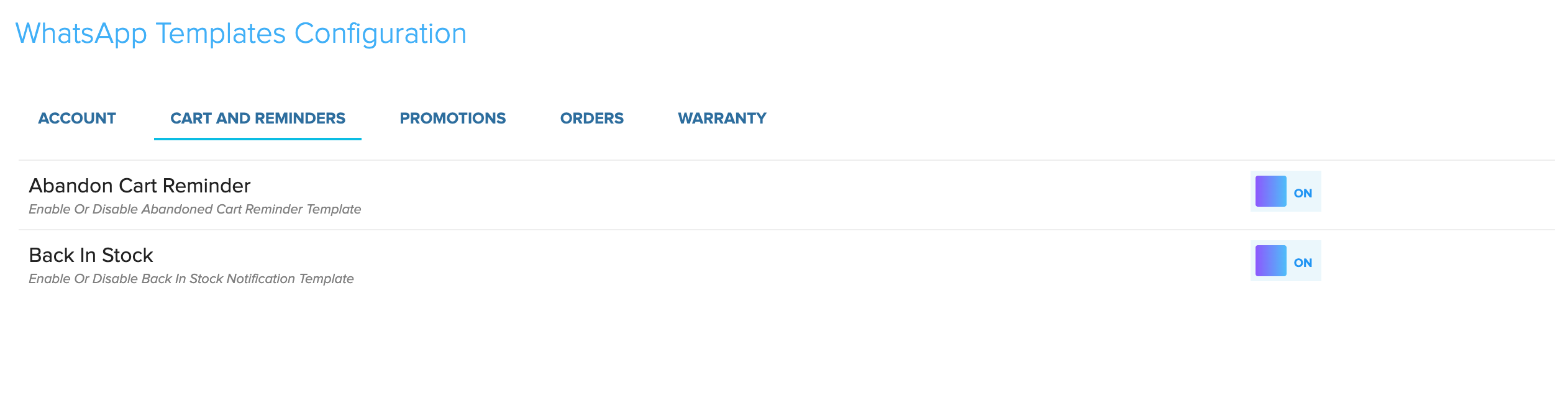
- Under Cart and Reminders, switch on the abandoned cart template.
- Save the change.
The e-mail goes anyway. This adds a message on the app your buyer already has open for the family chat. The full clicks are in Send whatsapp messages, and WhatsApp marketing shows what else it can do.
Wedding season starts on 20 November and the winter sales on 1 December, so this week is a good week to do it.
Make sure the cart still works
A reminder only brings the buyer back. The product must still be active, the price right, and the size or colour in stock. Sarees, lehengas and sweaters often run out in one size, so check the variants.
Also check the support phone and e-mail in Shop Profile. A buyer with one doubt will use them.
The wrong move is to switch the reminder on and forget the product page. A reminder cannot fix a sold-out size or a wrong price.
Smaller baskets make this matter more. The Economic Times reported on 12 November that India’s online festive sales grew 17 per cent to ₹1.41 lakh crore, and Business Standard reported the same day that shoppers spend less per order. Smaller carts are easier to leave.
See if it helps
Open the Dashboard and note Orders and Conversion Rate for the last 7 days today. Look again after two weeks. Wedding season and the winter sales will move your numbers too, so read the change with care. Details are in Your store dashboard.
Still, a reminder that is switched on beats one sleeping in the cupboard. One cart, one reminder, one chance before the family committee moves on to the next blouse colour.

Do this today
The 10-minute plan:
- Read the abandoned cart Help article.
- Switch on the abandoned cart template in Whatsapp Gateway.
- From your own phone, add your test product to the cart and go up to checkout.
- Note Orders and Conversion Rate on the Dashboard.
If you get stuck, your private WhatsApp support group has the developers, designers and testers who build Shopnix. Every plan has 0% commission on sales, and the store is built for India: UPI, GST invoices, 10 payment gateways, Indian couriers and pincode checks.
Frequently asked questions
Can I change the reminder timing or message?
No, Shopnix sends it on its own schedule, and only the WhatsApp template switch is yours.
Do reminders go only on WhatsApp?
No, they also go by e-mail, and the WhatsApp one needs the abandoned cart template switched on.
Can I see a list of abandoned carts?
No, Store Manager does not show one.
That lehenga does not always need a bigger discount. Sometimes it needs a polite reminder. Switch it on today and let the family vote end happily.