Turn off COD for refusing pincodes

The 20-second version: Look at your refused COD orders, find the pincodes that repeat, and turn off Is COD Available only for those. Keep online payment open so those buyers can still order.
Picture this. It is Diwali evening, the house smells of ghee and diyas, and your COD parcel of festive gift boxes is finally at the buyer's door. The delivery boy rings the bell. The buyer peeps out and says, 'Arre, my cousin already sent the same thing.' Parcel refused. Back it comes.
Beta, I have seen this in my own shop for twenty years, long before apps. A refused parcel is like a guest who comes to the door, looks at the food and leaves. You did all the cooking and nobody ate. The good news is that you do not have to lock the whole house. You only have to shut one or two doors.
The parcel that came back
You already paid to send that first parcel. Then comes the trip back, and the time you spend sorting it out. Nobody enjoys this.
It rises right after Diwali, when Diwali is on 8 November this year. Gifts were ordered in a hurry, minds change, and a cash payment is easy to say no to at the door. Online payment is different, because the buyer has already paid.
Now here is the thing. Not every pincode behaves the same. Some areas never give you trouble. A few keep sending parcels back again and again. So do not close COD for everyone. Close it only where the refusals repeat.
Find the pincodes that keep saying no
Sit down with your chai and open Orders in your Store Manager. Search by Order Status and pick REJECTED or RETURNED. Look only at the Cash On Delivery ones from the last few weeks.
Open each order and note the delivery pincode. Do not worry about big calculations. If the same pincode shows up more than once, put it on your review list. Your own eyes are enough here.
One more thing, and I say this like a nani. Keep your order status honest. If a refused parcel still says SHIPPED, you will never see the pattern. Use Update orders in bulk to tidy up many at one go.
Switch COD off only there
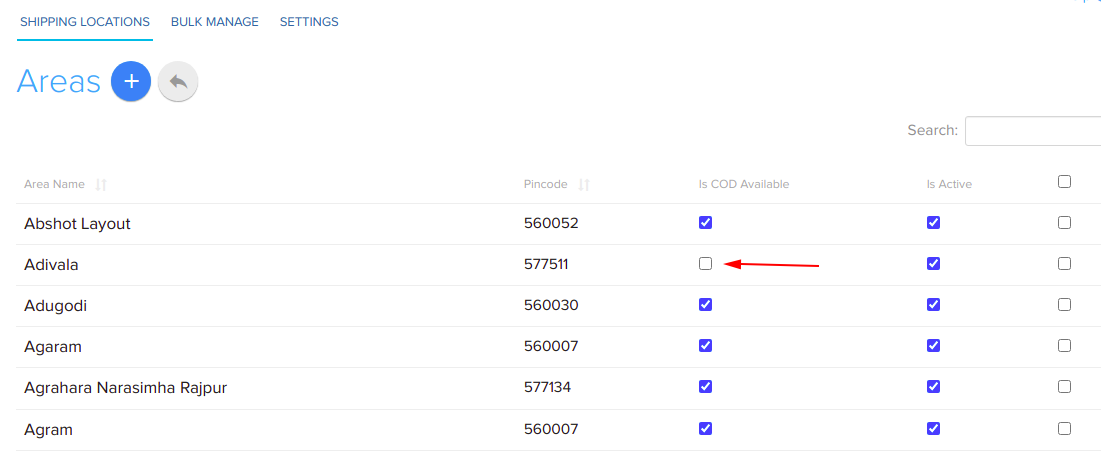
Now go to Setup → Locations. Every pincode lives inside a State, then a City, then an Area. Each Area has a setting called Is COD Available. That is your little door.
- Go to Setup → Locations and open the State, then the City.
- Open the Area that carries the pincode from your review list.
- Switch off Is COD Available and save.
Have many pincodes? Do not edit one by one, you will get tired and grumpy. Use Bulk Manage on the same Locations page. Download the CSV, change the COD column for your risky pincodes, and upload it back. The full steps are in Offer cash on delivery by pincode and Set up delivery locations, states, cities and areas.
Tip: Switching COD off for a pincode does not block the pincode. It only removes cash payment there. Delivery stays as it was.
Keep the door open for online payment
Here is the honest limit. This works only if your store also takes online payment. If COD is your only payment method, turning it off will stop orders from that pincode completely. Check this first. Your gateway is under Setup → Shop Profile → Payment Gateway, and this Help page explains how to choose one.
If online payment is on, a buyer in a blocked pincode can still pay by UPI or card and you still get the sale. You only lose the refusal at the door.
For the pincodes where COD stays open, add two small guardrails. Under Settings → Orders → Cod, set a COD charge and a short COD message. Under Settings → Orders → Checkout, turn on OTP validation, so the buyer confirms the phone number before ordering. Small steps, same afternoon.
Do this before the next parcels land
- Check your refused COD orders from the last few weeks.
- Mark the pincodes that repeat.
- Switch COD off only there, and confirm online payment is open.
No new software to learn, and no commission is cut on your sales. Shopnix charges 0% commission on every plan, and COD, UPI and pincode checks are built for India, as the COD and UPI payments page shows. If your pincode list is messy, ask in your private WhatsApp support group, where the people who build Shopnix will help.
Remember, beta: you do not stop cooking because one guest did not eat. You just stop setting a plate at the door that is always empty.

Frequently asked questions
Will buyers in a blocked pincode still be able to order?
Yes, if your store has online payment enabled. They will pay online instead of cash. If COD is your only payment method, those orders will stop.
Can I change COD for many pincodes at once?
Yes. Use Bulk Manage under Setup → Locations to download the CSV, edit the COD column and upload it back.
Where do I set the COD charge and COD message?
Go to Settings → Orders → Cod. You can add an extra charge and a short message that shows when the buyer picks COD.
A closed door in one lane is better than a shop shut for the whole city. Check your orders today, beta, and chai can wait ten minutes.