
Set up delivery locations (states, cities and areas)
Add the states, cities and areas you deliver to. Customers choose from these locations at checkout. Locations are also where you set shipping charges by city and cash on delivery by pincode.
How locations are organised
Locations have three levels: states, then cities inside each state, then areas (with a pincode) inside each city. Add a state before its cities, and a city before its areas.
Add states
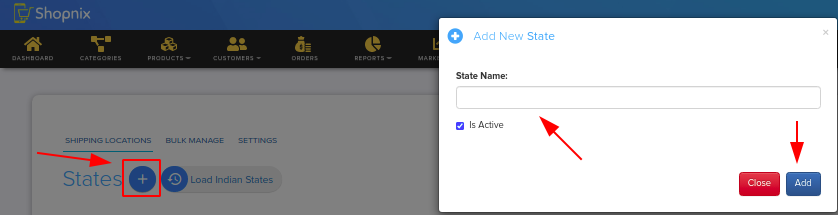
- Go to Store Manager → Setup → Locations. The States page opens.
- To add every Indian state in one go, click Load Indian States.
- To add a state yourself, enter the state name and click Add.
Turn a state on or off
States loaded with Load Indian States are active by default. To stop showing a state at checkout, untick the Active box next to its name. Tick it again to turn it back on.
Add cities
- Go to Store Manager → Setup → Locations.
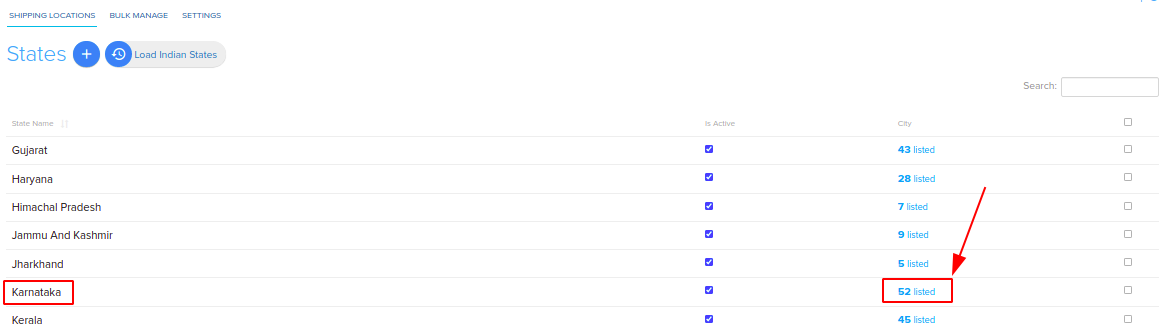
- Click the City link next to the state, for example 26 listed in the City column.
- On the City page, enter the city name and click Add.
Add areas
- Go to Store Manager → Setup → Locations.
- Click the City link next to the state.
- Click the Area link next to the city.
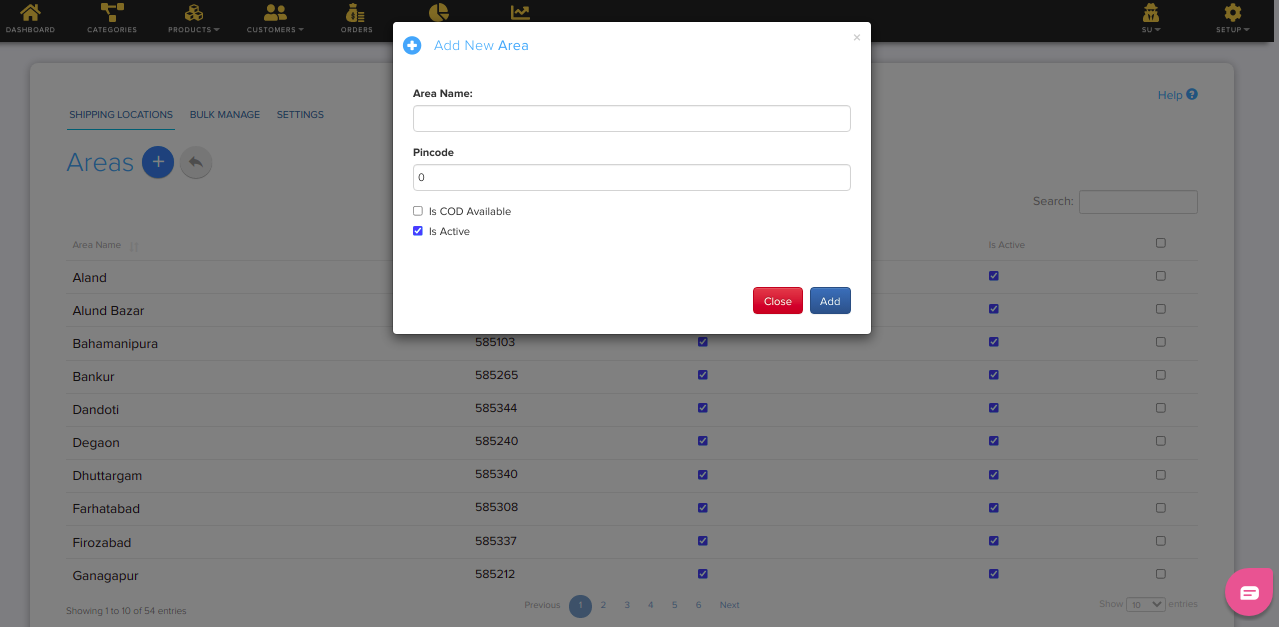
- On the Area page, enter the Area name and its Pincode, then click Add.
Each area also has a Shipping Charge, an Is COD Available option and an Is active option. Each city has a Shipping Charge and an Is Active option.
Add or change many locations at once
- Go to Store Manager → Setup → Locations and open Bulk Manage.
- Download the locations CSV file.
- Edit the file, for example to add areas and pincodes.
- Upload the file back.
Deliver only to your pincodes
You can limit orders to the pincodes you have added. Turn on pincode-restricted delivery under Store Manager → Setup → Settings, on the Orders tab, then Checkout. See Checkout options.
Example
You deliver only in Bengaluru. Click Load Indian States, open the cities for Karnataka and add Bengaluru. Then open the areas for Bengaluru and add each area you serve, such as Indiranagar with pincode 560038.
Related articles
- Charge shipping by city
- Offer cash on delivery by pincode
- Minimum order and free shipping
- Set up couriers
Need more help? Email support@shopnix.io or call +91 8880788813.
No comments to display
No comments to display