
Charge shipping by city
Add an extra shipping charge for a particular city, for example a city that costs your courier more to deliver to. The charge is set on each city in your delivery locations.
Before you start
- Add the state and city first. See Set up delivery locations (states, cities and areas).
- Turn on city shipping charges under Store Manager → Setup → Settings, on the Orders tab, then Additional Charges.
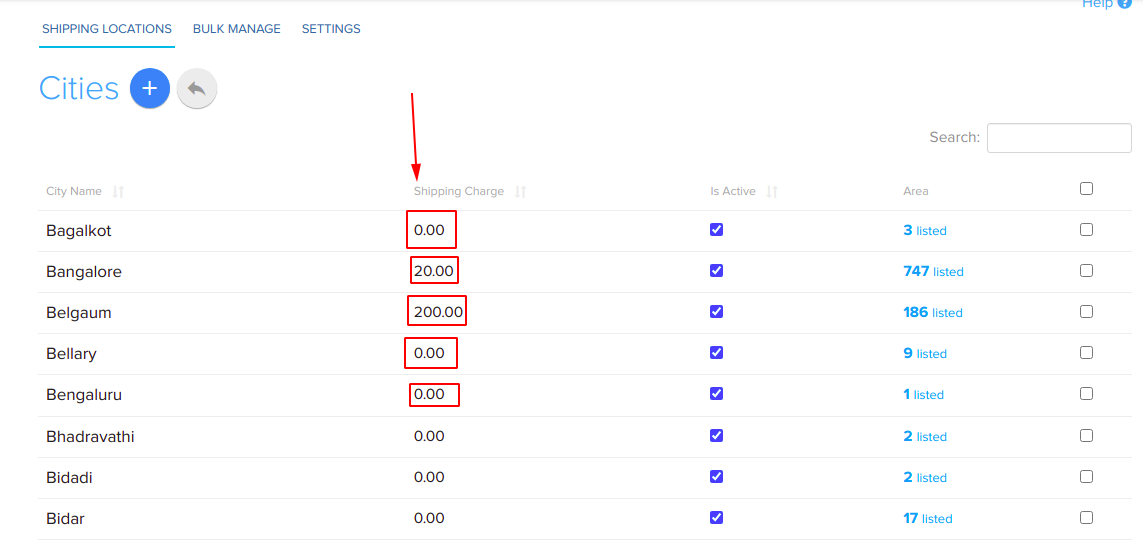
Set a shipping charge for a city
- Go to Store Manager → Setup → Locations. You see the list of states.
- In the City column, click the link for the state, for example 26 listed for Assam.
- Click the city's shipping charge. A text box appears.
- Enter the shipping charge for the city, for example
50for ₹50. - Press Enter on your keyboard to save.
Charge shipping by area
You can also set a Shipping Charge for each area (pincode) inside a city. Open the city's Area list under Store Manager → Setup → Locations. Area shipping charges are turned on in the same Additional Charges settings.
Related articles
- Set up delivery locations (states, cities and areas)
- Offer cash on delivery by pincode
- Minimum order and free shipping
- Set up couriers
Need more help? Email support@shopnix.io or call +91 8880788813.
No comments to display
No comments to display