
Offer cash on delivery by pincode
Cash on delivery (COD) lets customers pay when their order arrives. You can turn COD on or off for each area, by its pincode. For example, offer COD only in areas your courier can collect cash from.
Before you start
- Turn on cash on delivery for your store. See Set up cash on delivery.
- Add the state, city and areas (with pincodes) you deliver to. See Set up delivery locations (states, cities and areas).
Turn COD on or off for an area
- Go to Store Manager → Setup → Locations. You see the list of states.
- In the City column, click the link for the state, for example 26 listed for Assam.
- Click the Area link next to the city to see its areas.
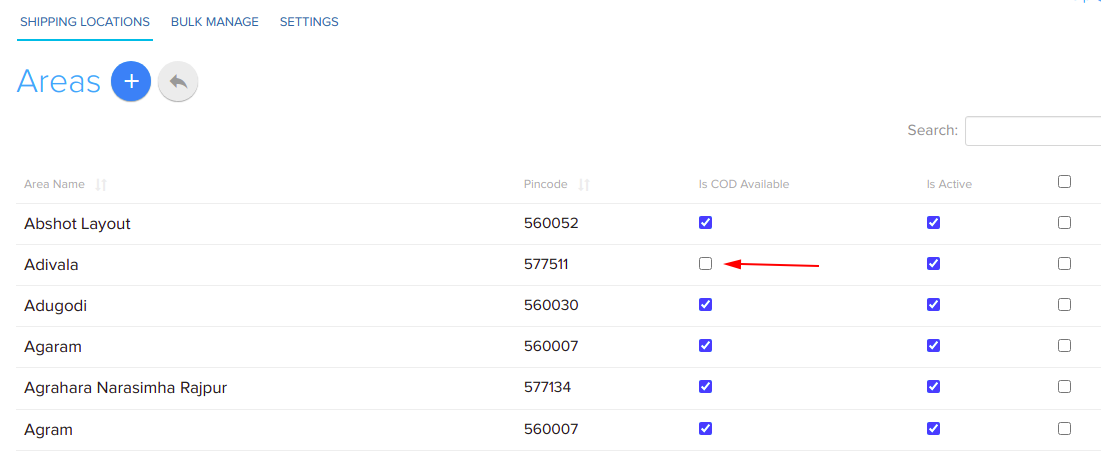
- Click the Is COD Available option for the area or pincode to turn COD on or off.
What happens next
Customers who deliver to a pincode with COD turned on can choose cash on delivery at checkout. For other pincodes, COD is not offered.
Related articles
- Set up cash on delivery
- Set up delivery locations (states, cities and areas)
- Track and update order payments
- Payment gateways: choose and connect one
Need more help? Email support@shopnix.io or call +91 8880788813.
No comments to display
No comments to display