
Track and update order payments
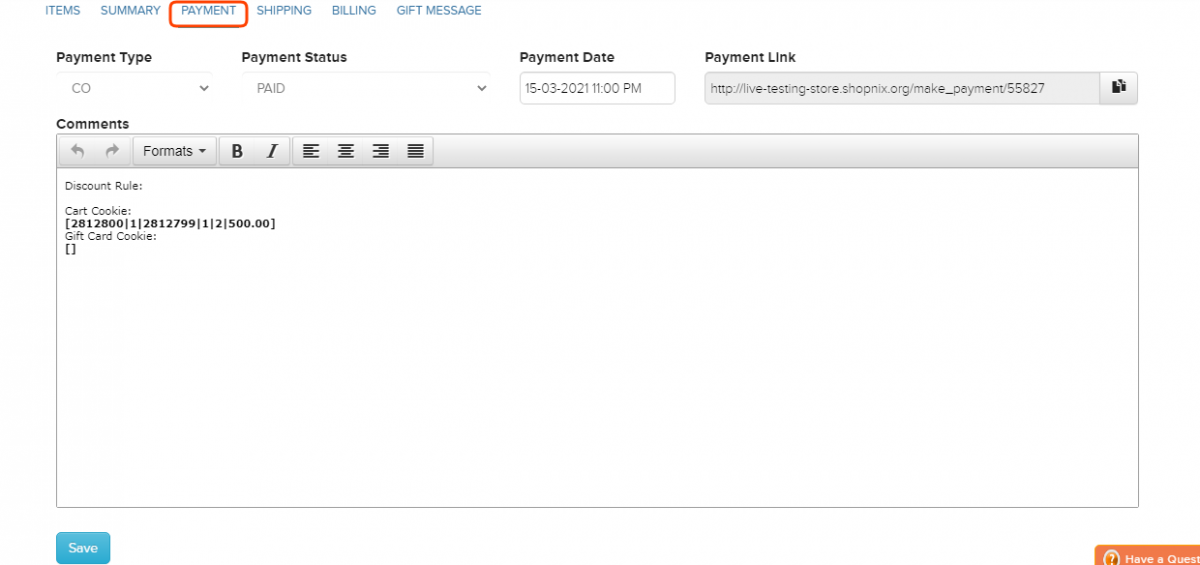
Each order has a payment type, a payment status and a payment date. Check these before you ship, and update them when a payment arrives, for example when a cash on delivery order is paid.
How payment timing works
- Online payments (credit card, debit card, net banking, UPI): you receive the money when the customer places the order.
- Cash on delivery (COD): you receive the money after the order is delivered.
- DD/MO/Cheque (bank transfer, demand draft or cheque): you receive the money when the customer pays into your account. Check it before you ship.
The payment types you can choose on an order are Cash On Delivery, Net Banking, Credit Card, Debit Card, DD/MO/Cheque and UPI.
Update an order's payment
- Go to Store Manager → Orders.
- Click the order number in the Order Id column.
- Open the Payment tab.
- Change the payment type, payment status or payment date.
- Click Save.
Payment statuses
| Status | What it means |
|---|---|
| PAID | You have received the payment from the customer. |
| PENDING | The payment has not arrived yet, for example a COD order that is not delivered. |
| FAILED | The payment failed at the payment gateway. |
| REFUNDED | The payment was given back to the customer, for example for a cancelled or rejected order. |
What happens next
Once the payment is in order, change the order status to SHIPPED. See Process and update an order.
Related articles
- Process and update an order
- Send a payment link
- Set up cash on delivery
- Accept bank transfers
- Paid order report
Need more help? Email support@shopnix.io or call +91 8880788813.
No comments to display
No comments to display