
Process and update an order
Open an order to see and change its details, update its payment, and mark it as shipped with a tracking link for the customer.
Open an order
- Go to Store Manager → Orders.
- Click the order number in the Order Id column.
- The order opens with its details on separate tabs. See Order tabs below.
- Make your changes and click Save.
Order tabs
| Tab | What you can see or change |
|---|---|
| Products | The products in the order. Type a product name and the other fields fill in automatically. |
| Summary | Additional Shipping Charge, Area or City Shipping Charge, COD Charge, Discount Coupon Amount, Gift Card Amount, Ordered Date, Order Status, delivery window (Delivery between), and Order and Customer Comments. |
| Payment | Payment Type, Payment Status, Payment Date, Payment Link and Comments. |
| Shipping | Shipping Name, Shipping Email ID, Shipping Phone, Shipping City, Shipping State, Shipping Pin code, Shipping Area and Shipping Address. The order also holds the billing address and the customer's GSTIN. |
| Gift Message | Gift Message From, Gift Message To and Gift Message. |
The order also shows Shipment Details (Courier Name, Consignment ID and Tracking Link). If your store lets customers upload files at checkout, they appear under Reference Files.
Mark an order as shipped
A new order has the status NEW. When you hand it to the courier, change the status to SHIPPED. The tracking link only becomes available once the status is SHIPPED.
- Go to Store Manager → Orders.
- Find the order and click its value in the Change Status column.
- Select SHIPPED.
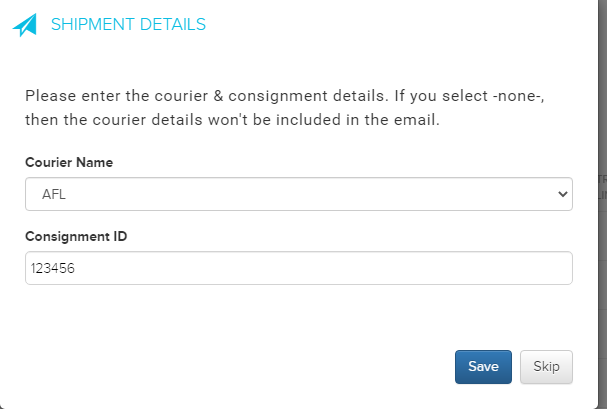
- In the pop-up, select the Courier Name and enter the Consignment ID.
- Click Save.
What happens next
The order status shows SHIPPED and a tracking icon appears in the Tracking Link column. Click the truck icon to track the shipment. Shopnix emails the customer about every status change, and sends a WhatsApp message if WhatsApp is turned on. For all statuses, see How orders work.
If you use Shiprocket, you can book the shipment from the order with Ship Now. See Ship orders with Shiprocket.

Related articles
- How orders work
- Track and update order payments
- Update orders in bulk
- Set up couriers
- Print or email an order invoice
- Ship orders with Shiprocket
Need more help? Email support@shopnix.io or call +91 8880788813.
No comments to display
No comments to display