
Offer delivery slots
A delivery slot is a time window when an order can be delivered. Customers choose the slot that suits them. This means fewer missed deliveries, and you can plan how many deliveries you make in each time window.
Example
A grocery store offers three delivery slots each day: 9am–12pm, 12pm–3pm and 3pm–6pm. A customer who is at work all morning picks 3pm–6pm. You can offer only some slots at some times, so your delivery staff are not overloaded.
Before you start
- Delivery slots are turned on by Shopnix. If you don't see Delivery Slot in the Setup menu, contact Shopnix support to turn this on.
Set up delivery slots
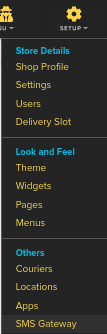
- Go to Store Manager → Setup → Delivery Slot.
- Add a slot for each time window you want to offer, using the fields below.
- Save each slot.
Delivery slot fields
| Field | What it does | Example |
|---|---|---|
| Delivery Slot Number | The slot's number. | 1 |
| Delivery Start Time | When the delivery window starts. | 9:00 am |
| Delivery End Time | When the delivery window ends. | 12:00 pm |
| Delivery Gap Time | A gap time for the slot. If you're not sure what to enter, ask Shopnix support. | – |
| Allow No of Order's | The most orders you accept for this slot. | 20 |
| Active | Untick to stop offering the slot. | Ticked |
| Supplier | Franchise (multi-store) stores only: the store the slot belongs to. | – |
What happens next
At checkout, customers pick one of your active slots for their delivery.
Related articles
- Set up delivery locations (states, cities and areas)
- How orders work
- Checkout options
- Run franchise stores
Need more help? Email support@shopnix.io or call +91 8880788813.
No comments to display
No comments to display