Take bulk wedding return gift orders on your online store

The 20-second version: Make a separate bulk listing with a minimum quantity, collect names at checkout, and send a Payment Link before you buy raw material. Add the buyer's GSTIN when a planner or company orders.
Picture this: a message at 11 pm. 'Wedding on 28 November, 200 return gift boxes, names on every box. Rate?' You say yes on WhatsApp, jot it in a notebook, and the payment is still only a promise.
Arre, relax. As per the Indian calendar, wedding season starts around 20 November, and these orders are landing now. Here is how to take them through your own store.
Fifty boxes, one date, zero patience
A wedding order is not a normal order. It has a big quantity, a date that cannot move, names or text to print, and a lot of money at stake. A normal checkout handles none of that, so the notebook takes over.
Treat it like a run chase: know the target before the first ball. Here, the target is quantity, date, text and payment.
Tip: Do this today: list the products people buy in bulk for weddings. A mithai shop in Bengaluru, a dry fruit hamper seller in Delhi, a brass gift maker in Moradabad or a potli maker in Jaipur usually has two or three.
One bulk listing, one minimum
Make a separate listing for the bulk version, such as 'Kaju katli gift box, wedding pack'. Under Products → Add a Product, set Minimum Order Quantity to the smallest batch you will make, say 50.
Use variants for the choices buyers make: box size, ribbon colour, sweet mix. You get up to 3 options, and each variant has its own price and stock. Set the GST rate and HSN code once, and every invoice comes out right.
If the box is made from ready stock, switch on Auto Reduce Stock Level. If you make it to order, use Pre-Order with a Pre-Order Available By date.
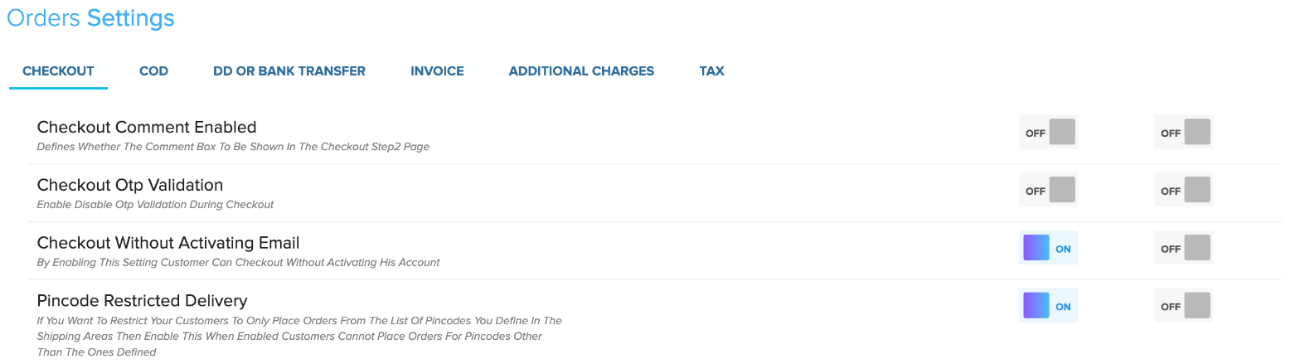
Now the names. Switch on the comment box at Setup → Settings → Orders → Checkout, so buyers can type the couple's names, the wedding date and the print text. See checkout options for details. Gift messages at checkout are on the Mega plan only.
Get paid before you buy the kaju
A seller post on r/smallbusinessindia this week told a familiar story. The bulk order was dispatched, and then the buyer would not pay the balance until delivery. Nobody wins that match.
So flip it. Create the order yourself in Store Manager and send a payment link. The buyer pays by UPI or card before you buy a kilo of raw material. For very large amounts, offer bank transfer as well.
One limit, said plainly: COD is a store-wide or per-pincode setting, and it cannot be limited by order value. So take bulk orders as orders you create, and collect through the Payment Link. A small jugaad, but it works.
- Create an order for the customer from Orders, with address and quantity.
- Fill in the Delivery between dates, so everyone on your team sees the deadline.
- If the buyer is a planner or a company, add their GSTIN to the order.
- Send the Payment Link.
- Start making only when the payment shows PAID.
Price tiers and the GST invoice
You do not need a spreadsheet for price tiers. Take an example: a ₹180 box, and 100 boxes come to ₹18,000. Create a coupon like WEDDING5 for 5% off orders above ₹15,000 under Marketing → Discount Coupons, with a minimum order amount. Share the code only with bulk enquiries. Your listed price stays the same.
Planners and companies often need their GSTIN on the invoice. Add the buyer's GSTIN on the order and it appears on the invoice. A box sent from Bengaluru to Chennai is billed with IGST, and one sent within Karnataka with CGST plus SGST. The store works this out from your GST state.
Check your own GSTIN and GST state at Setup → Settings → Orders → Tax, and read how to set up GST invoices. At month end, Reports → Order Reports → Tax Report gives your CA the totals.

Before the first enquiry lands
- Bulk listing with Minimum Order Quantity
- Comment box switched on
- Payment Link tested on a dummy order
- Coupon ready for bulk enquiries
- Your GSTIN and GST state set
- WhatsApp updates switched on
Turn on WhatsApp order updates for confirmed, shipped and delayed orders. The family hears from you before they start calling.
If a setting is not clear, ask in your store's private WhatsApp support group, where the people who build Shopnix answer. And with 0% commission, a big wedding order is all yours.
Frequently asked questions
Can a buyer order fewer boxes than my minimum?
No. Set Minimum Order Quantity on the bulk listing and checkout asks for at least that many.
Do I need the Mega plan for wedding orders?
No. Coupons, variants and Payment Links work on every plan. Discount Rules by product tag and gift messages at checkout are Mega plan only.
Set up one bulk wedding listing and send yourself a test Payment Link this week. Then the next 'Rate?' message can wait for your morning chai.