
Set up Google and Facebook login
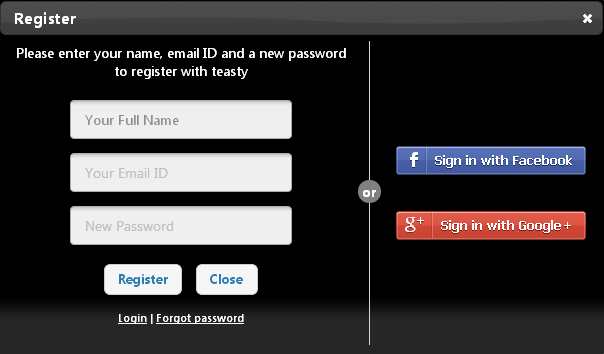
Let customers register and log in to your store with their Google or Facebook account. Your store already includes Google and Facebook login. To use them, you create an app with Google or Facebook, then paste its App ID and App Secret into Store Manager.
Before you start
- You need a Google account (for Google login) or a Facebook account (for Facebook login).
- Know your store's address, for example
YOUR-STORE.com. You enter it when you create the Facebook app.
Get your Google login keys
In the Google Cloud console, create a project (you can name it after your shop) and create an OAuth client ID with the application type Web application. Add your store's authorised redirect URL. Google then shows a Client ID and a Client Secret.
Google's screens change often. Follow Google's own guide: Setting up OAuth 2.0.
| Google gives you | Paste it into Store Manager as |
|---|---|
| Client ID | Appid |
| Client Secret | Appsecret |
Get your Facebook login keys
In Meta for Developers, register as a developer, create a new app and add the Website platform. Enter your store's address as the site URL and add a contact email. Make the app live (active). The app's dashboard then shows the App ID and App Secret.
Follow Facebook's own guide: Facebook Login for the Web.
| Facebook gives you | Paste it into Store Manager as |
|---|---|
| App ID | Appid |
| App Secret | Appsecret |
Turn on Google or Facebook login in Store Manager
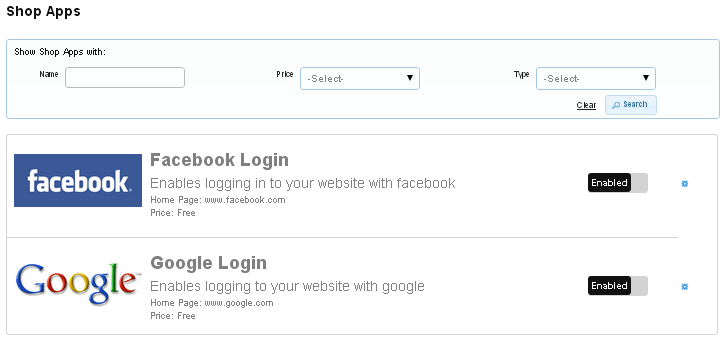
- Go to Store Manager → Setup → Apps. You see the list of shop apps, including Facebook Login and Google Login.
- Click Enable next to the app you want to use. Click Disable to turn it off again.
- Click the settings (gear) icon next to the Enable/Disable button.
- On the app's settings page, enter the Appid and Appsecret you copied from Google or Facebook, and save.
What happens next
Customers see a Google or Facebook option on your store's login and register page. They can log in with that account instead of typing their details.
Related articles
Need more help? Email support@shopnix.io or call +91 8880788813.
No comments to display
No comments to display