Customer paid by UPI but the order still says pending

The 20-second version: If the buyer says UPI is paid but the order is pending, do not pack on a screenshot and do not ask them to pay twice. Check the gateway, match the UTR, then mark the order paid or send a Payment Link from the same order.
The customer sends you a screenshot: money gone, UPI says success. Your store says PENDING. Both of you are now staring at your phones like they are senior officers in a serious meeting.
Diwali week makes this little drama extra spicy. Dry fruit boxes, mithai hampers, gift packs, courier pickup waiting downstairs, and one order sitting there like a guest who has reached the gate but not rung the bell.
Let us settle it calmly. Not like a developer. Like a shop owner who has packing tape in one hand and WhatsApp in the other.
First, pending is not the villain
When a buyer pays by UPI, the money moves through the bank and the payment gateway. Your store updates only after the gateway confirms the payment.
Sometimes the buyer closes the page. Sometimes the phone signal performs its usual drama. Sometimes the bank is slow. The buyer sees success, but your order is still waiting for confirmed news.
So PENDING does not always mean unpaid. It means: “I have not received confirmation yet.” Very polite, but not very useful when your courier person is asking for the parcel.
On Cashfree and PhonePe, the gateway can also tell the store directly when the payment is confirmed, even if the buyer does not return to the payment page.
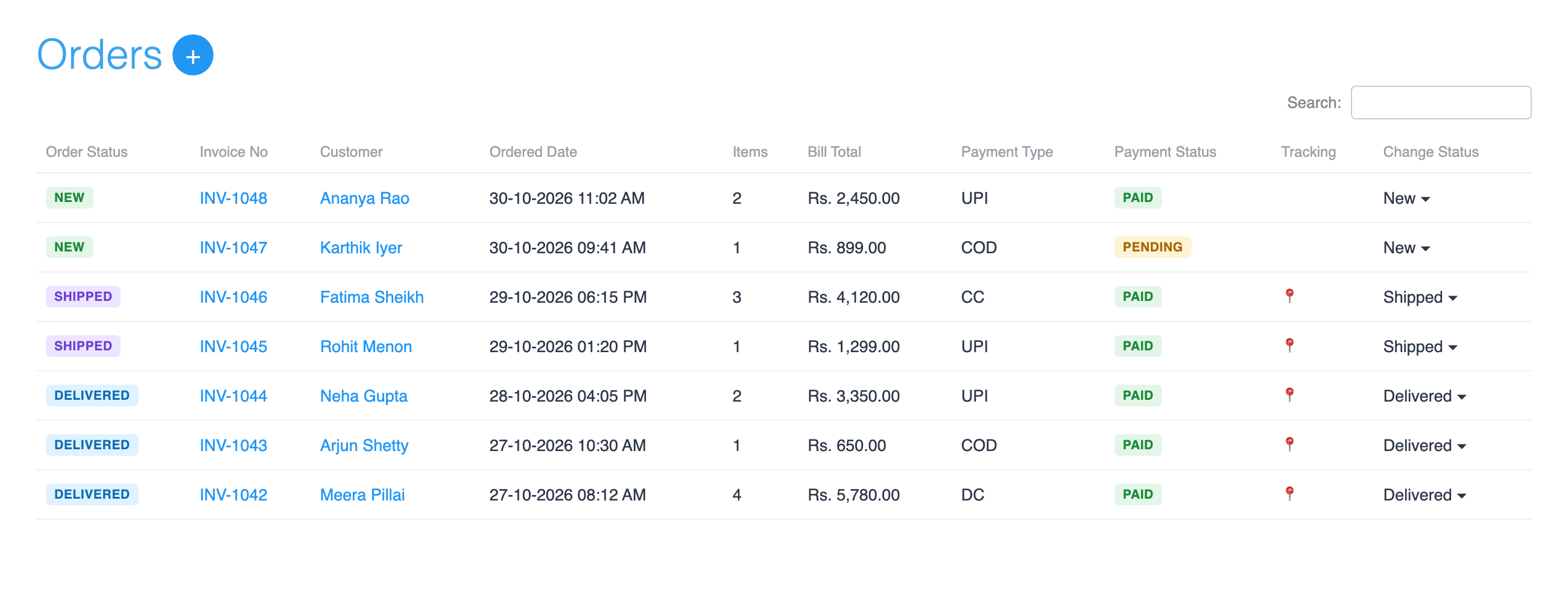
In Store Manager, open Store Manager → Orders and use the Payment Status search to see today’s PENDING orders. During Diwali orders payment pending cases should be checked before the courier comes, not after dinner.
Read the status like a shopkeeper
Shopnix keeps order status and payment status separate. This one small thing saves a lot of confusion.
| Payment status | What it means for you |
|---|---|
| PAID | Gateway has confirmed the money. You can process the order. |
| PENDING | Not confirmed yet. Check before packing. |
| FAILED | Gateway has reported failure. Do not mark paid unless you verify money separately. |
| REFUNDED | Payment has gone back. |
An order can be NEW and PENDING at the same time. NEW tells you the order stage. PENDING tells you the payment stage.
Tip: Tell your packing staff one simple rule: nothing marked PENDING leaves the table until someone checks the payment.
The screenshot is not the cashier
The most common wrong move is very tempting: buyer sends screenshot, merchant packs the parcel. I understand. Screenshot looks official, has a green tick, has bank name, looks ready for framing.
But a screenshot is not proof that your gateway captured the payment. It only tells you what the buyer’s phone is showing. Before you pack, check the gateway dashboard.
- Open the order in Store Manager → Orders.
- Open your payment gateway dashboard in another tab.
- Match the amount, time and buyer phone or email.
- Ask the buyer for the UPI reference number, also called UTR.
- If the gateway shows the payment captured, update the payment status on the order.
- If the gateway shows no payment or failed payment, do not pack yet.
Picture this: a ₹1,850 dry fruit box comes in at 9 pm. Buyer says UPI payment done but order not confirmed. Gateway shows the payment captured at 9:02 pm. Good. You can mark order as paid manually and pack it with a peaceful heart.
For the exact clicks, use Track and update order payments. I will not repeat every button here, otherwise this nice chai-time read will become a tuition notebook.
If the money is not there, keep it clean
Sometimes the payment really has not reached the gateway. The buyer’s account may show debit, but your gateway has no captured payment. This is the classic money debited order pending online store headache.
Do not immediately say, “Please pay again.” Also do not create a new order. Both can confuse the buyer and your staff. One gift hamper suddenly becomes two records, and then everyone needs tea.
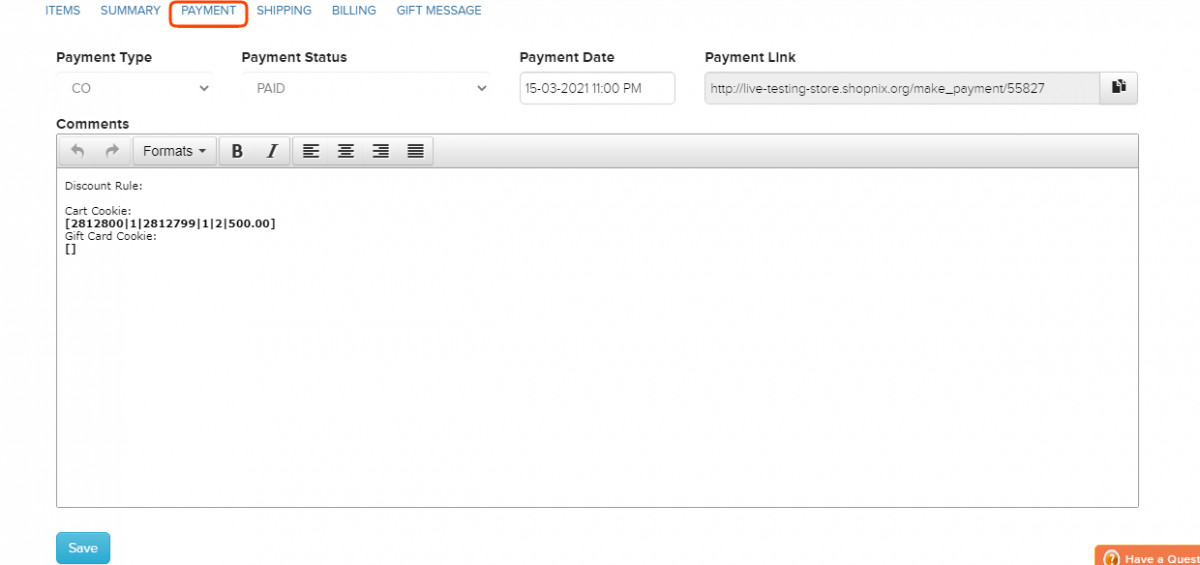
Instead, send a Payment Link from the same order if the payment did not go through. The buyer pays against that order, and your team does not have two orders for one box of kaju katli.
Here is the calm WhatsApp reply I would keep ready:
Tip: “We can see your order, but the payment is not confirmed in our gateway yet. Please share the UPI reference number. We will check it once and then either confirm the order or send a payment link on the same order.”
Use Send a payment link for the steps. If you are still setting up gateways, this page on UPI and card payments for Indian stores explains the Shopnix side.
Your Diwali routine: ten quiet minutes
Dhanteras and Diwali week are not the time to discover pending orders under a pile of packing slips. Make it a small routine. Like checking whether the shop shutter is fully down.
- Morning: open Store Manager → Orders and search Payment Status = PENDING.
- Check each pending order against your gateway before packing starts.
- Evening: open Store Manager → Reports → Paid Order Report and match the day’s paid orders with your gateway view.
- Turn on desktop alerts for new orders so payment gateway order status not updated cases do not sit unseen.
The report steps are here: Paid Order Report. Desktop alerts are here: Get desktop alerts for new orders.
If pending orders keep appearing even after the gateway shows paid, message your private WhatsApp support group. The developers, designers and testers who build Shopnix are in the group for your store, and they can look at the payment setup with you.
Shopnix is built for India: UPI, COD, GST invoices, 10 payment gateways, Indian couriers and pincode checks. And there is 0% commission on sales, on every plan, so your Diwali rush does not bring a surprise platform cut.
Frequently asked questions
Should I pack if the buyer sends a UPI success screenshot?
No. First check your payment gateway and match amount, time and UTR. Pack only after the money is confirmed or you have manually marked the order paid after verification.
What does PENDING mean in Shopnix?
PENDING means the payment is not confirmed yet. It is not the same as unpaid, so check the gateway before deciding.
Should I ask the buyer to place a fresh order?
No. If payment failed or is missing, send a Payment Link from the same order so your records stay clean.
Before tonight’s orders come in, open Orders, search Payment Status = PENDING and check each one against your gateway. Do this once calmly, and the 9 pm UPI drama becomes just another parcel on the table. With respect, may your Diwali packing tape never finish at the wrong time.