
Create discount coupons
Discount coupons give customers money off when they enter a code at checkout. You can offer a percentage off or a flat amount off, set a minimum order value, and limit how many times a coupon can be used.
Create a coupon
- Go to Store Manager → Marketing → Discount Coupons.
- Click + (Add New Discount Coupon).
- Fill in the coupon details. See Coupon fields below.
- Click Add.
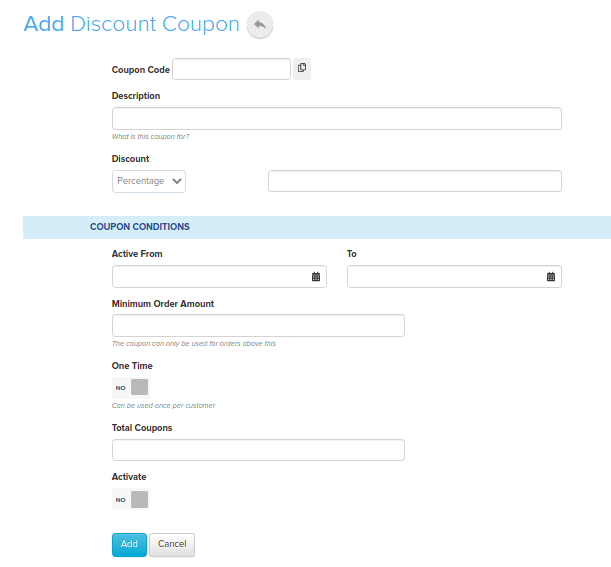
Coupon fields
| Field | What it does | Example |
|---|---|---|
| Coupon Code | The code customers enter at checkout. | DIWALI20 |
| Coupon Name | A name to help you recognise the coupon. | Diwali offer |
| Coupon Start Date | The first day customers can use the coupon. | 25 Oct |
| Coupon End Date | The last day customers can use the coupon. | 27 Oct |
| Coupon Type | Percentage takes a percentage off the price. Flat Amount takes a fixed amount off. | Percentage |
| Discount | The percentage or amount to take off. | 20 |
| Min Order Amount | The coupon only works on orders above this amount. | ₹500 |
| Total Available | How many times the coupon can be used in total. | 100 |
| Total Used | How many times the coupon has been used so far. | 0 |
| One-time use | Each customer can use the coupon only once. | Yes |
| Active | Turn the coupon on or off. | Yes |
How the discount is calculated
- Percentage: a 20% coupon on a ₹1,000 product brings the price to ₹800 (₹1,000 × 80%).
- Flat Amount: a ₹20 coupon on a ₹1,000 product brings the price to ₹980 (₹1,000 − ₹20).
Find, edit or delete a coupon
- Go to Store Manager → Marketing → Discount Coupons.
- To find a coupon, use the Show Discount Coupon with search box.
- To edit a coupon, click its code in the Coupon Code column, make your changes and save.
- To delete a coupon, click the delete icon on its row, then confirm.
Show coupons in your store
Coupons are not shown in your store by default. Customers can still use a code you share with them. To display a coupon code on your store pages, add an HTML widget in Store Manager → Setup → Widgets. If you use WhatsApp, you can also turn on the coupon success message. See Send WhatsApp messages.
Related articles
- Set up discount rules
- Sell and manage gift cards
- Widgets: what they are and how to add one
- Abandoned cart reminders
Need more help? Email support@shopnix.io or call +91 8880788813.
No comments to display
No comments to display