
Sent SMS report
The sent SMS report lists the SMS your store has sent to customers, such as order and delivery updates. Use it to check whether messages were sent successfully or failed.
Open the report
- Go to Store Manager → Reports → SMS Report.
- To see all sent SMS, click Generate Report without filling in any search fields.
- To see only some messages, fill in the search fields first, then click Generate Report.
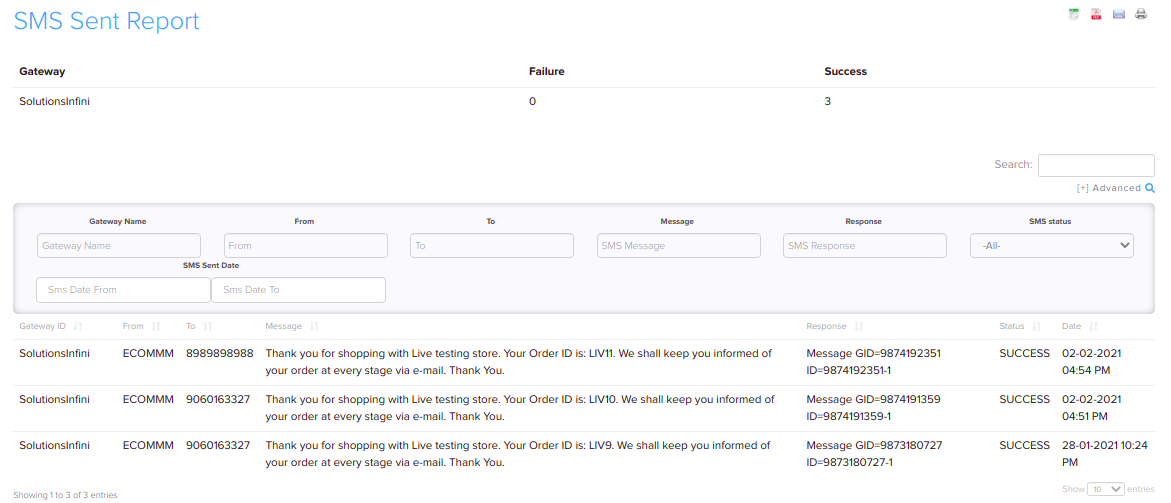
Filters
| Filter | What it does |
|---|---|
| Gateway | Show SMS sent through a particular SMS gateway. |
| Date | Show SMS sent on particular dates. |
| Status | Show SMS that were sent successfully (Success) or that failed (Failed). |
| Message | Search the text of the SMS. |
| Response | Search the reply your SMS gateway sent back, for example an error message. |
Related articles
Need more help? Email support@shopnix.io or call +91 8880788813.
No comments to display
No comments to display