
Take pre-orders
A pre-order lets customers order a product before it is released or back in stock. You can show a message on the product page, such as the date the product will be available.
Turn on pre-order for a product
- Go to Store Manager → Products → Add a Product. For an existing product, go to Store Manager → Products → Manage Products, search for the product and click its SKU, for example
PROD008. - Tick Pre-Order. The Pre-Order Available By box appears.
- In Pre-Order Available By, type the date the product will be available, or any other message. For example, "Available from 15 November".
- Tick Active so the product shows in your store.
- Check the stock level is more than 0.
- Click Save.

If Active is not ticked, the product does not show in your store, even with pre-order on. If the stock level is 0, the product shows as out of stock.
You can also tick or untick Pre-Order for a product in the Manage Products list. The Pre-Order Available By message can only be added on the product page.
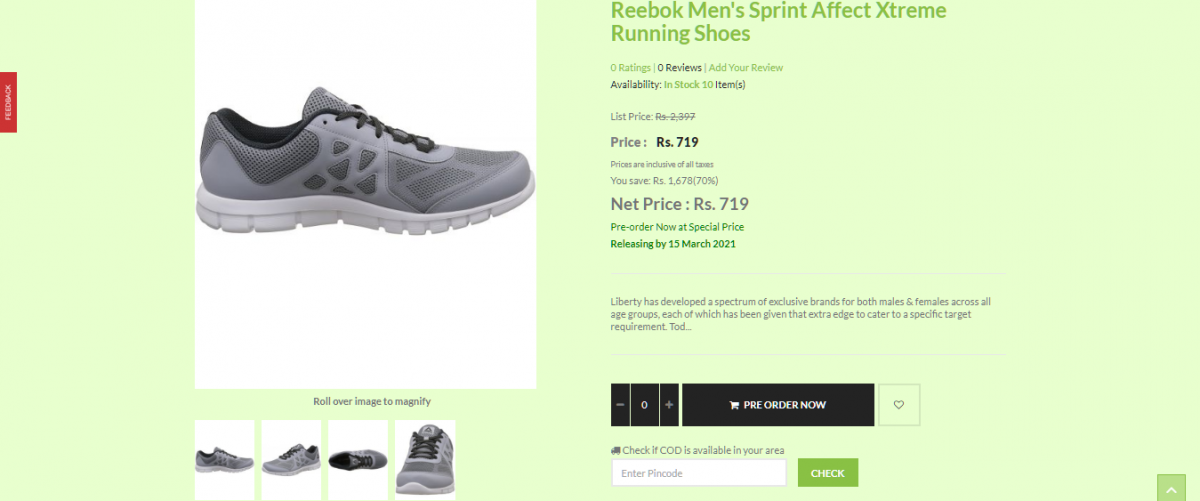
What customers see
The product page shows your Pre-Order Available By message.
Related articles
Need more help? Email support@shopnix.io or call +91 8880788813.
No comments to display
No comments to display