PROMOTE · GOOGLE SHOPPING
Your products, right inside Google.
When someone searches for what you sell, your product can show up with its photo and price. Shopnix sets up your Google Merchant Center account, prepares your product listings, and keeps them up to date every night. Free listings cost nothing.
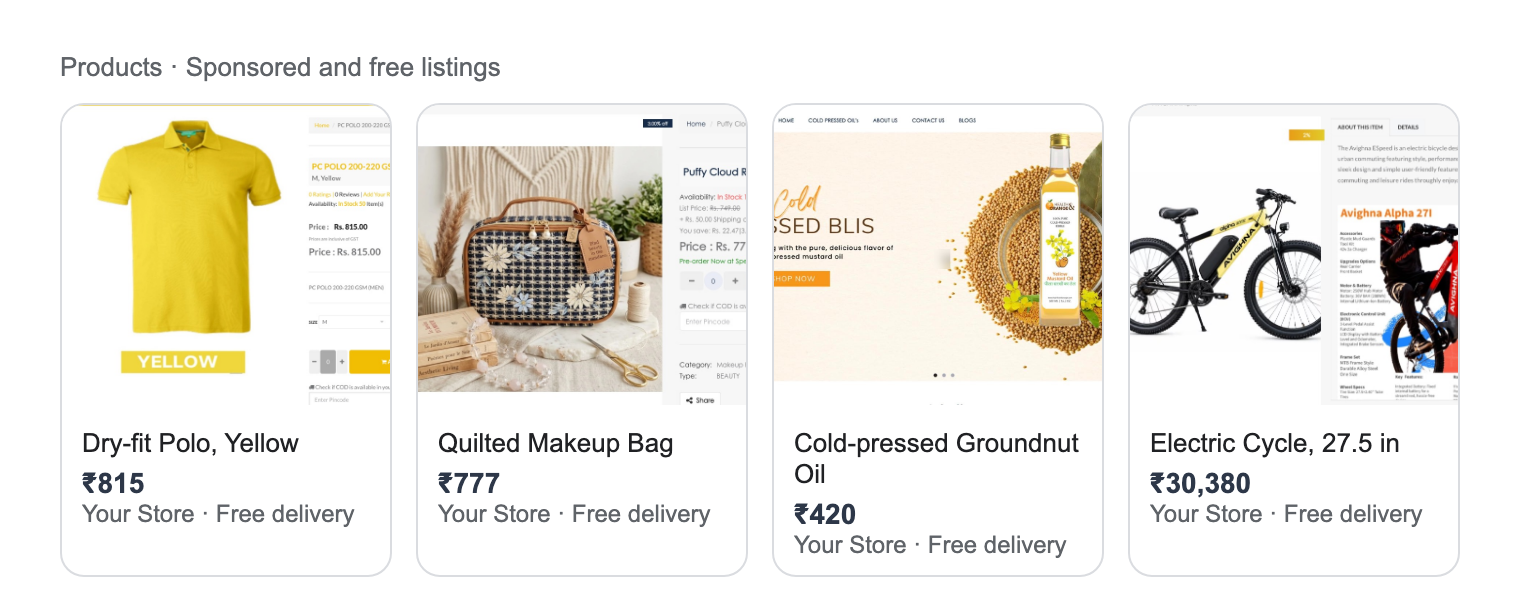
Example, made with real products from Shopnix stores.
BEFORE YOU START
Two things Google Shopping needs
Google also checks your store for a return policy, contact details and secure checkout. Add them as pages on your store and link them in the footer.
Your online store →Free, across Google
- The Shopping tab
- Product results in Google Search
- Google Images
- Google Lens, when someone photographs something like it
 Google
 Google Ads
HOW IT WORKS
From your catalogue to Google, while you sleep

You add products
Photos, title, price, stock, as usual.

Shopnix builds the feed
Every night, for your whole catalogue.

Merchant Center
Set up by Shopnix. Google checks each product.

Shown on Google
Shopping tab and search results.
Google Merchant CenterGoogle ShoppingGoogle Ads (your account)Logos belong to their owners.
DONE FOR YOU
No Merchant Center headaches
Merchant Center is where most sellers give up: account setup, feed files, policy warnings. Shopnix handles it.
THE PRODUCT FEED
21 details per product, filled in for you
Google needs a feed: a file with every product in its format. Shopnix writes it from your catalogue. Most of it you've already filled in without knowing.
Already in your store
idtitledescriptionlinkimage_linkadditional_image_linkpriceavailabilitybrandproduct_typeitem_group_idcolorsizematerialpatternTitle, price and stock come from the product. Colour, size, material and pattern come from your variants. Extra photos go as extra images. A description nixi wrote, or a photo whose background nixi removed, goes to Google the same night.
Where you add a little
gtinmpnconditionidentifier_existsgoogle_product_categoryshipping_weightThe barcode number (GTIN) for branded goods, the maker's part number, new or used, and weight. Making your own products with no barcode? That's allowed, and the feed says so.

EVERY SIZE AND COLOUR
49 variants, 49 listings
This real polo has 49 size and colour combinations. Each goes to Google as its own offer, with its own price and stock. Someone searching "yellow polo XL" can land on exactly that.
WHAT YOU FILL, WHAT YOU SEE
A few details in, approval status back


What Google looks for
- A clear photo on a plain background
- The same price as on your store
- A GTIN (barcode) where the product has one
Store Manager, shown with sample data.
GET MORE CLICKS
The title does most of the work
In Shopping, buyers see a photo, a title and a price. That's all. Make the title say what they typed.
Plain background
- No text or logos on it
- nixi can remove the background
Same as your store
- Change it on the store
- The feed follows that night
Fill it in
- Your own brand name is fine
- Buyers search by brand
Keep it true
- Sold out shows sold out
- Avoids clicks that can't buy
FREE OR PAID
Start free. Add ads when you're ready.
BY BUSINESS
Who gets the most from Shopping
People search by name
- Add the GTIN from the barcode
- Compete on price and delivery
- Electronics, toys, beauty
Search by colour and size
- Each variant listed
- Photo per colour
- Clear titles: fabric, colour, fit
Specific searches
- "Cold-pressed groundnut oil 1 litre"
- Pack sizes as variants
- Weight for delivery cost

“They recognize the minutest details and provide the most suited solution. Team Shopnix are very trusted and competent.”Mital Sanghvi · Business Development, SapnaOnline.com




Keep exploring
Frequently Asked Questions
No. Shopnix sets up your Google Merchant Center account, prepares your product listings, and keeps them up to date every night.
Not yet. The product feed goes to Google Merchant Center today.
Active paid stores on their own domain, like yourbrand.in. Stores on a free Shopnix subdomain are not sent to Google.
Title, description, link, photos, price, stock, brand, product type, colour, size, material, pattern and variant group from your products, plus GTIN, MPN, condition, Google category and shipping weight from the Merchant Center tab. WebP photos are converted to JPEG for Google.
Free listings in Google Shopping and search are free. Paid Shopping ads run from your own Google Ads account, with your own budget.
Good photos, a clear title and price. Where you have them, add GTIN, MPN, condition and shipping weight in the Google Merchant Center tab of each product.
Yes. Every variant is sent as its own offer, with its own price and stock.
Shopnix pulls each product's status back from Google, so you can see what is approved and what needs fixing.
Put your catalogue on Google
Try Shopnix free for 14 days. No credit card needed.


