SELL · SERVICES
Let customers book you, not chase you.
Customers pick a service, choose a time slot and pay on your website. No more "is 5 pm free?" on WhatsApp at 11 at night.

A REAL SHOPNIX STORE
A whole region's services, on one website
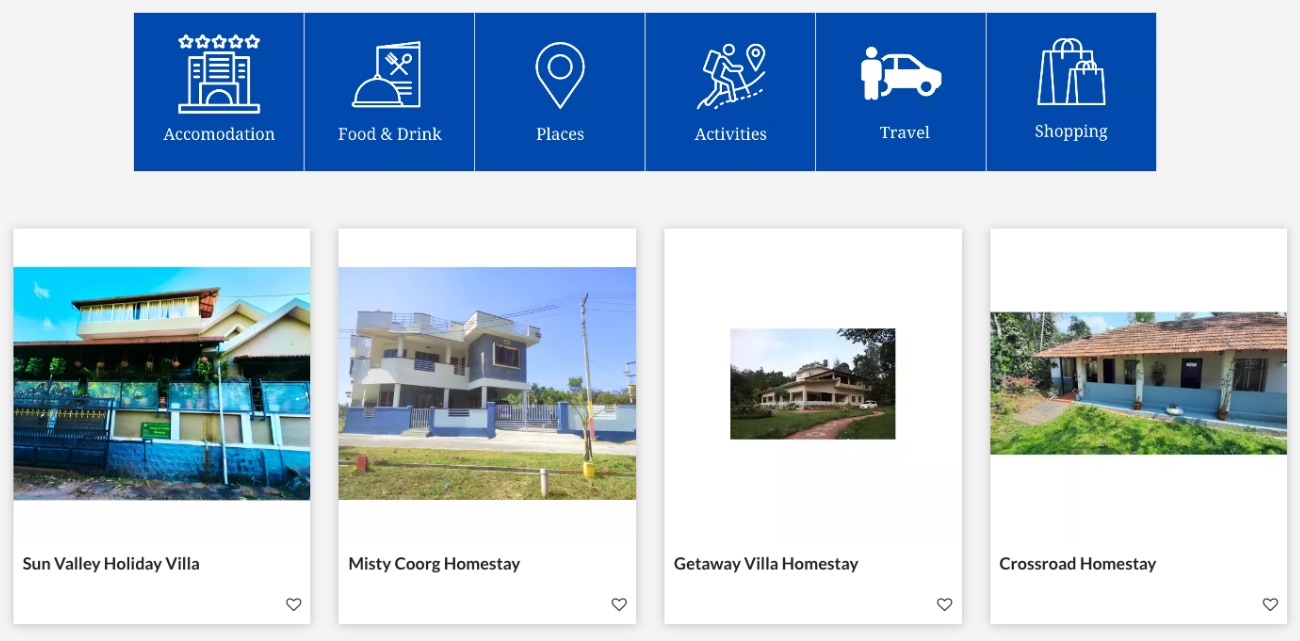
A local guide to Coorg lists homestays, estate stays, camping, electricians, plumbers and builders, sorted by town.
WHO SELLS SERVICES
Every service business books differently
A salon fills chairs, a yoga studio fills batches, a plumber fills a route across town. Here's what each one needs, and how it's done on Shopnix. Store mock-ups below are examples, built from real photos.

Fill every chair, never double-book one
Your diary is your income. Gaps lose money, and two customers for one chair lose a customer.

Batches that fill themselves
Yoga, dance, music, tuition, swimming. Parents want to see batch timings and pay without calling you every month.

Jobs in the areas you actually cover
AC service, plumbing, electricians, pest control, cleaning. Your day is a route across town, so where the job is matters as much as what it is.

Real details from a homestay on a Shopnix store, laid out as a booking page.
Guests decide on details
Homestays, estate stays, camping. Guests compare photos, meals and rules, check the dates are free, and book directly when they trust the page.

Food that arrives when they want it
Lunch has to land before 1. A birthday cake has to land on the birthday. Timing is the whole product.

Packages, advances and quotes
Small jobs have a fixed price. Big ones need a conversation. Your website should handle both.
HOW BOOKING WORKS
Four taps for the customer. Zero calls for you.
Pick a service
With photos and a price.
Pick a slot
Full slots can't be booked.
Pay
Online, or at the visit.
It's in your orders
With the slot and their notes.
TIME SLOTS
Set your hours once. Never get double-booked.
Set a start time, an end time and how many bookings each slot can take. Three chairs in your salon? Allow three. The fourth customer picks another time.
How to set up slots →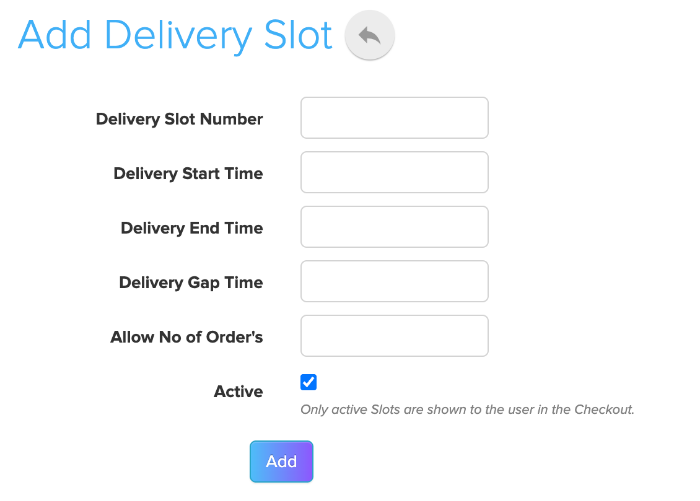
SERVICE AREAS
Only take bookings where you can reach
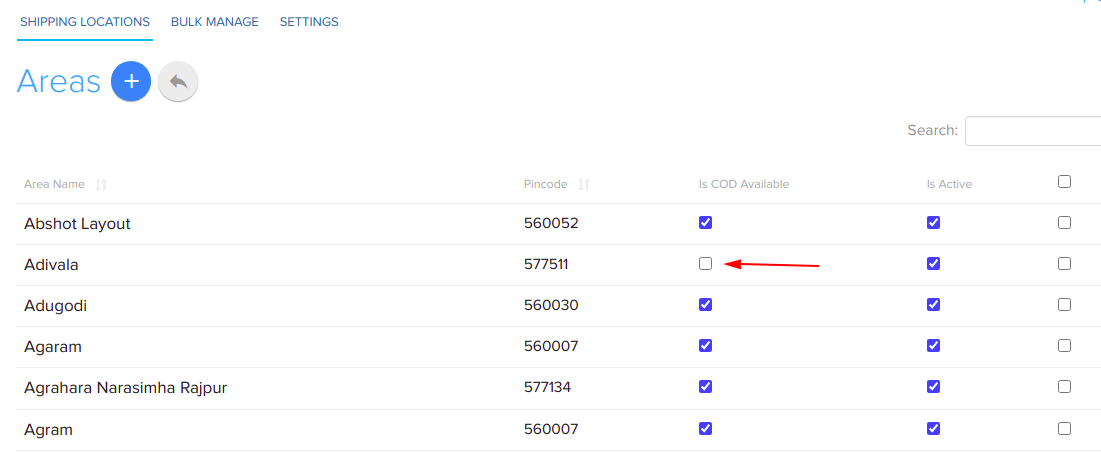
Going to customers' homes? List the areas and pincodes you cover. Nobody outside them can book. Turn pay-at-visit on or off for each one.

PAY AT THE VISIT
Let them pay when they come in
Switch on cash on delivery and rename it "Pay at the salon". Add a small charge if you like.

CONFIRMATIONS
Booking confirmed, on WhatsApp
Customers get a WhatsApp message when they book, and again when anything changes. Switch each message on or off.
THE DIFFERENCE
Bookings on WhatsApp vs bookings on your website
BOOK AND PAY
Booked, paid and confirmed

 Google Pay


Take the full amount or an advance online.
 WhatsApp
 Email
EmailBooking confirmations on WhatsApp and email.
Logos belong to their owners.
ENQUIRIES AND QUOTES
For jobs that need a quote first
A wedding, a deep clean or a custom cake needs details first. Customers fill a form, it reaches your email, and you reply with a price.
CHECKOUT FOR BOOKINGS
Your booking rules, at checkout
Switch off stock counting on a service and it never shows "sold out". Slots keep their own limits. The rest is set at checkout.
 OTP check at checkoutCustomers verify their phone before ordering, so the number on the order is real.
 Cash on delivery, your wayAdd a COD charge, and a note customers see when they pick it. COD checked by pincode.
 Online bank transferFor big orders and business buyers. Your account details are shown at checkout.
 Order notes"Call before delivery." "Gate 2." "No onion, please."
 Delivery charge by areaA charge per city or area, and only the pincodes you deliver to.
 Minimum order valueNo ₹80 orders that cost more to pack and ship than they earn.
 Gift messageCustomers add a note for the person receiving the order.
 Free shipping above an amountPick the amount, and the shipping charge for orders below it.
Each one is a switch in Store Manager. Shown with sample data.
THE DETAILS
Small things that make service businesses run

“At present, they are handling more than 10 Million products and a Million users for us with a very analytical and focused approach.”Nijesh Shah · President, Business Operations, SapnaOnline.com







Keep exploring
Frequently Asked Questions
Turn on the OTP check at checkout. Customers verify their phone number before the booking is placed.
Yes. Turn on online bank transfer, and your account details are shown at checkout.
At checkout they pick from the time slots you set up. Only slots that still have space are shown.
Yes. Each slot has a number of bookings it can take. Once it is full, customers have to pick another time.
Yes. Allow cash on delivery and rename it to suit you, like "Pay at the salon". Or take full payment online by UPI or card.
Yes. List the pincodes and areas you serve, with a different charge for each if you like. Customers outside them cannot book.
Yes. Homestays and stays get a room availability calendar. Guests pick their dates, and dates that are already booked cannot be chosen.
Add an enquiry form. Customers send their details, the enquiry comes to your email, and you reply with a price.
Yes. A salon can sell hair products and a yoga studio can sell mats, in the same store.
Start taking bookings online
Try Shopnix free for 14 days. No credit card needed.


